
AI Decision
About AI Decision
The AI Decision node is used to make an AI-driven decision based on defined criteria within a workflow.
At a high level, it can be understood as an advanced if/else step. Instead of relying only on fixed logic, the node uses the provided criteria to decide whether the workflow should continue through an Accept or Reject path.
Because the decision is based on the criteria entered in the node settings, it can be used in many different ways depending on the workflow design.
How AI Decision works
When the workflow reaches this node, the AI evaluates the available context against the configured acceptance and rejection criteria.
The node creates two output paths: Accept(approved) and Reject (rejected), which you can connect to downstream nodes.
This makes the node suitable for workflows that need more flexible decision-making than a fixed rule alone. For example, it can be used after Document Collection, Form Input, Map Selection, or other steps where the workflow needs to evaluate submitted content against defined conditions. The AI Decision node evaluates the available workflow context (documents, variables, and submitted data) against your criteria to make a decision.
This node executes in the background after submission and routes the workflow through Accept or Reject based on the AI's evaluation.
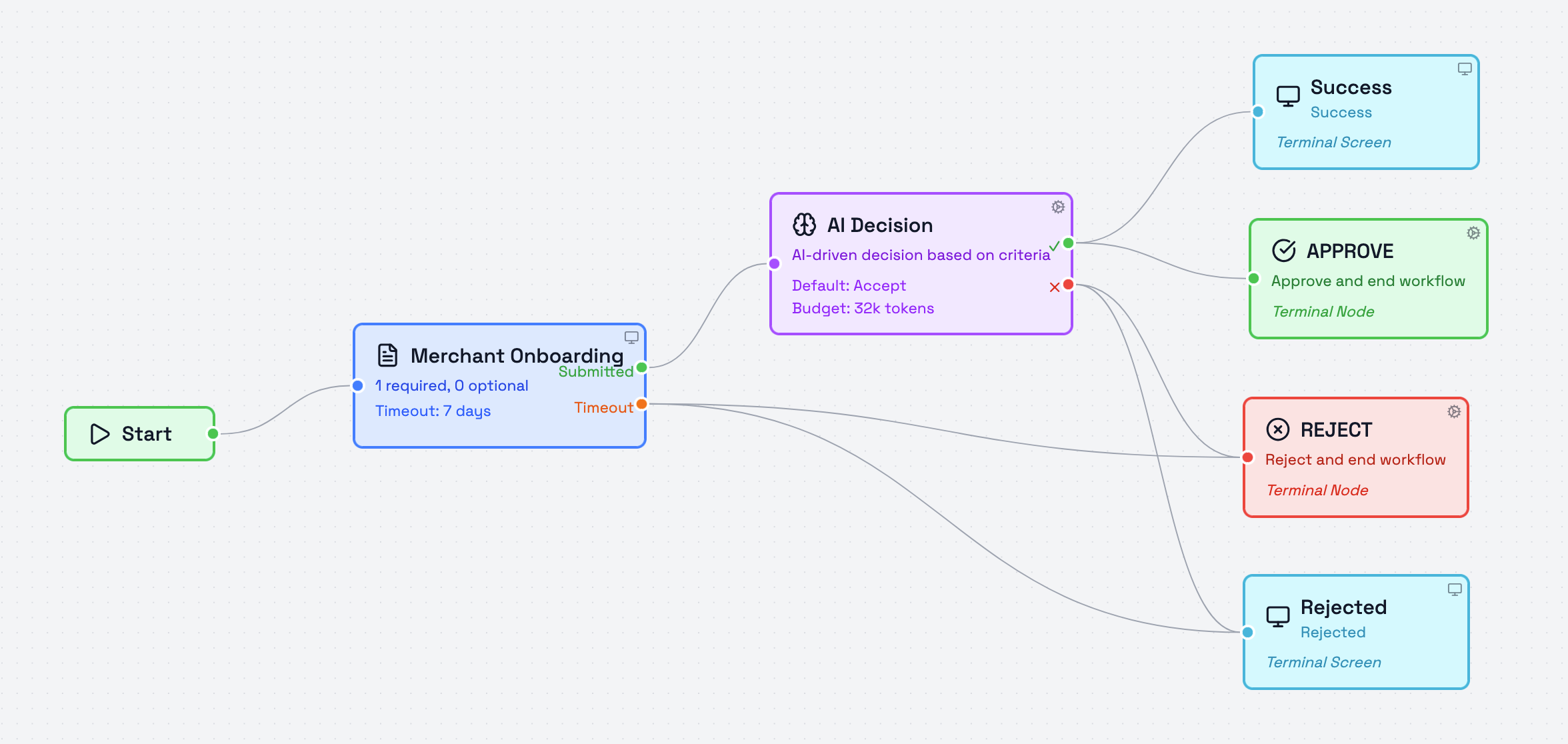
In the example above, the AI Decision Node is checking whether or not a utility bill was uploaded.
Acceptance Criteria
The Acceptance Criteria field defines when the AI should return an accept result.
This field is written as free-text guidance and should describe the conditions that must be met for the workflow to continue through the Accept path.
A good acceptance rule is specific and focused on what should be true.
Example:
- Document is valid and contains the required information
- Location selected is within the allowed service area
- Form response clearly confirms eligibility
Rejection Criteria
The Rejection Criteria field defines when the AI should return a reject result.
This field is also written as free-text guidance and should describe the conditions that should send the workflow through the Reject path.
A good rejection rule is specific and focused on what should not be true.
Example:
- Document is expired, fraudulent, or missing key information
- Selected location is outside the allowed area
- Form response indicates the applicant does not meet the required conditions
Default Behavior
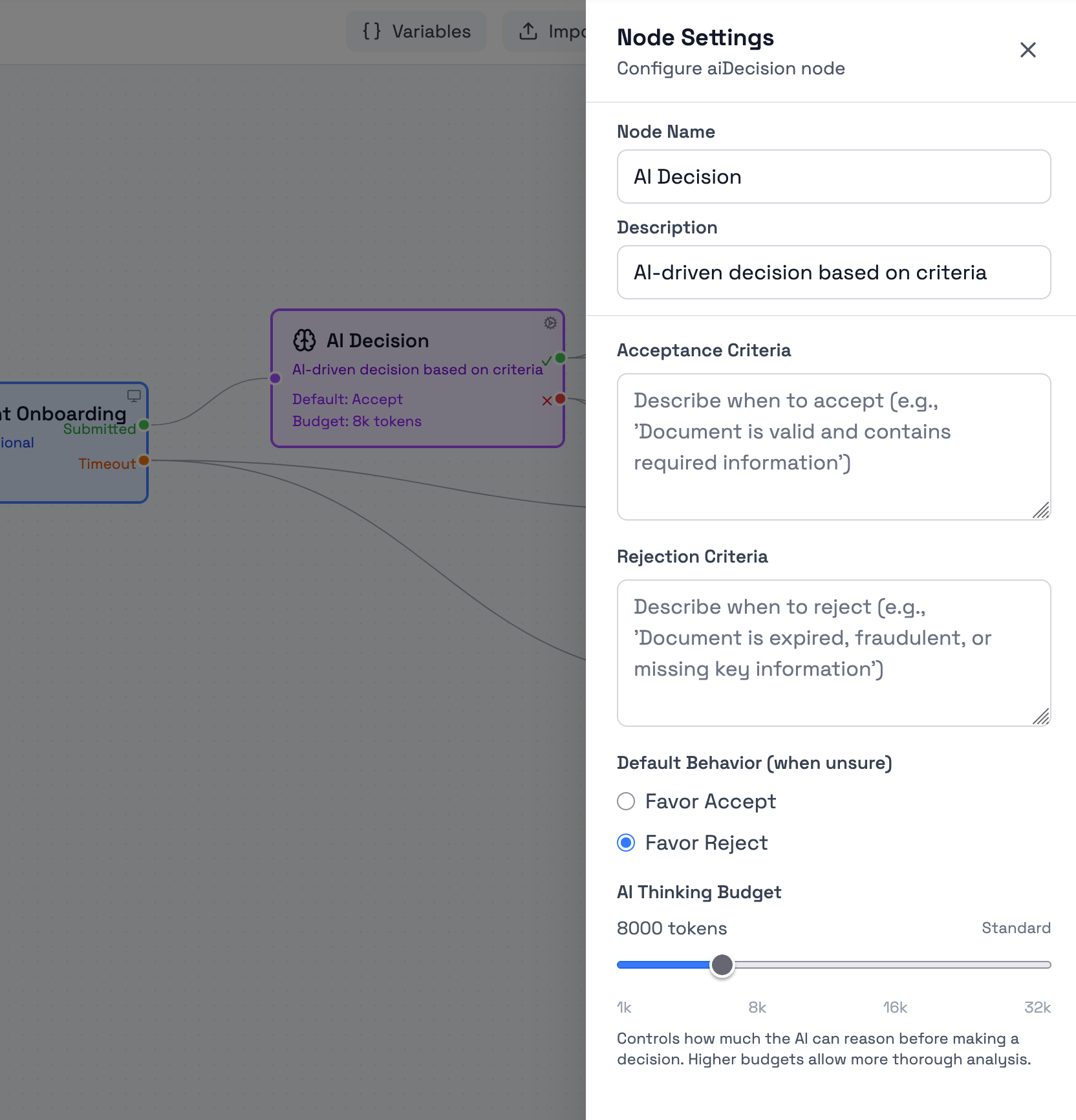
If the AI cannot confidently determine which criteria are met, it falls back to your Default Behavior setting. This handles ambiguous cases where the evidence doesn't clearly match acceptance OR rejection criteria.
The available options are:
- Favor Accept
- Favor Reject
The best fallback depends on how the node is being used in the workflow. For example.
- Favor Accept is usually better when the node is used for supportive decision-making and uncertain cases should continue for later checks, review, or downstream validation.
- Favor Reject is usually better when the node is being used as a stricter control point and uncertain cases should not move forward automatically.
AI Thinking Budget
The AI Thinking Budget controls how much reasoning the AI can use before making a decision.
Higher budgets allow more thorough analysis and can be useful when the criteria are more detailed or when the submitted content is more complex.
The current scale shown in the node settings is:
- 1k
- 8k
- 16k
- 32k
The standard budget is set to 8k tokens.
Example guidance
The right budget depends on how difficult the decision is and how much interpretation the AI must do before choosing an outcome.
-
1k tokens
Suitable for simple decisions based on short and direct criteria, such as checking whether a form answer clearly confirms or denies a required condition. -
8k tokens
Suitable for most standard decision tasks, such as evaluating whether a submitted document or response meets a defined set of acceptance and rejection conditions. -
16k tokens
Suitable when the node must evaluate more detailed criteria, compare several signals, or interpret less straightforward content before deciding. -
32k tokens
Suitable for the most demanding decision cases, such as nuanced reviews, broader context evaluation, or workflows where the decision has a higher impact and should be made with more thorough reasoning.
If you are unsure which level to use, it is usually safer to choose a higher budget, especially for more important decisions or more complex inputs.
Output Paths
The node includes the following output paths:
- Accept
- Reject
These outputs define which path the workflow follows after the decision is made.
Updated 4 months ago