
How Agentic Fraud Reasoning works
Agentic Fraud Reasoning adds an AI-assisted reasoning layer to document fraud review.
After a document has been submitted and processed, Agentic Fraud Reasoning can analyze the document and produce a structured fraud assessment. The assessment is shown to admins in the dashboard and can help them understand whether a document appears low risk, suspicious, or should be reviewed manually.
This guide explains the high-level process behind Agentic Fraud Reasoning from a customer-facing perspective.
Processing flow
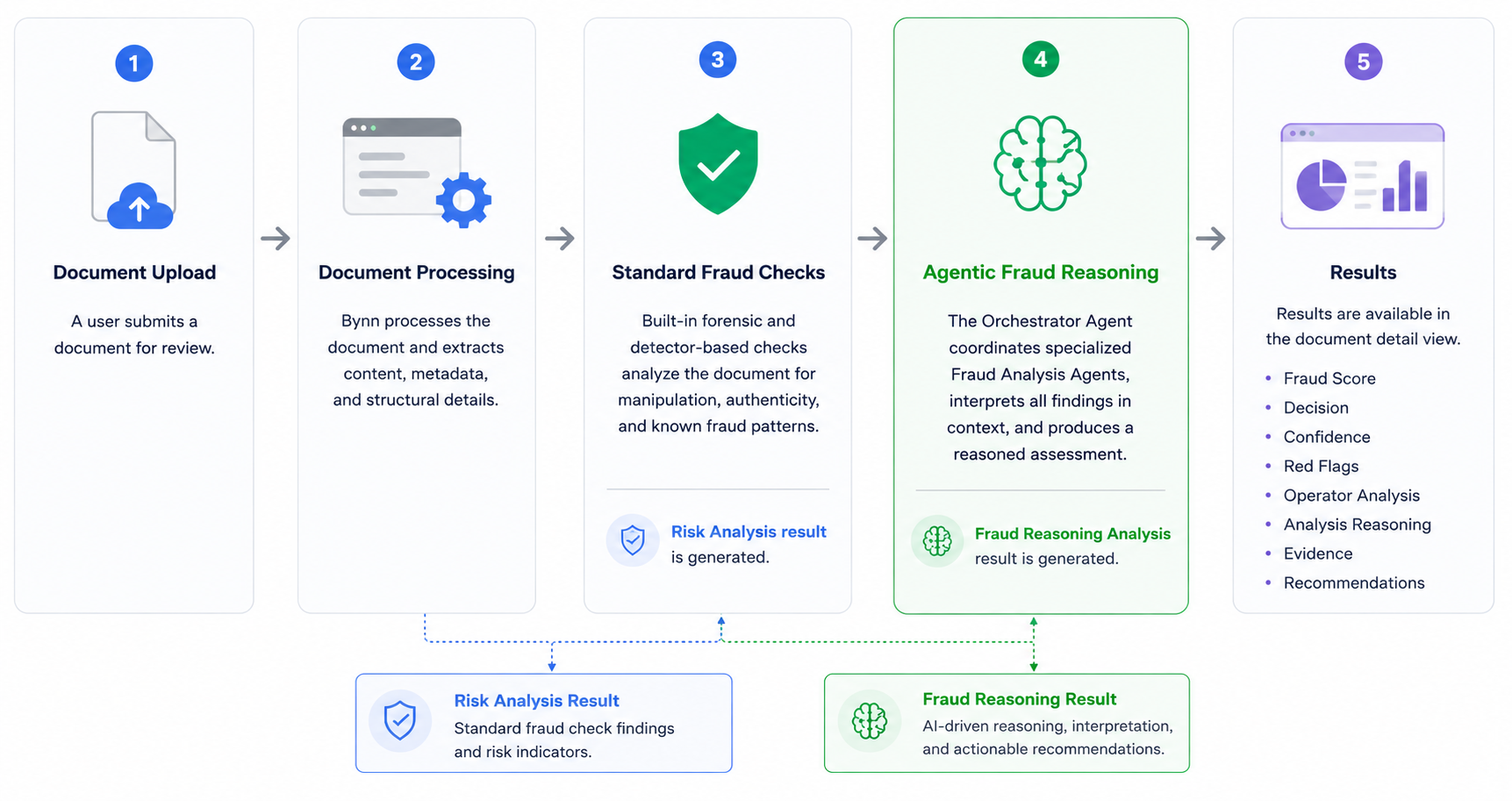
At a high level, Agentic Fraud Reasoning follows this process:
- A document is uploaded or submitted.
- Bynn processes the document.
- Standard document fraud checks are completed.
- Agentic Fraud Reasoning runs if it is enabled and configured for the document.
- The assigned Orchestrator Agent coordinates the analysis.
- Fraud Analysis Agents may contribute specialized findings.
- The result is saved and shown in the document detail view.
The result can include a fraud score, decision, confidence level, reasoning, red flags, evidence, recommendations, and summaries from the agents involved.
When Agentic Fraud Reasoning runs
Agentic Fraud Reasoning can run after the document has completed the earlier document processing and fraud detection steps.
Depending on the workspace configuration, analysis may run when:
- a document is uploaded
- a document matches an assigned document type
- an Orchestrator Agent is available for that document type
- an admin manually triggers or selects analysis, if manual analysis is available in the workspace
Agentic Fraud Reasoning is not the first processing step. It runs after Bynn has already processed the document and completed the standard document fraud checks.
This allows the reasoning analysis to consider the document together with the available fraud signals and document information.
Automatic and manual analysis
Agentic Fraud Reasoning may be used automatically or manually, depending on how the workspace is configured.
Automatic analysis
When automatic analysis is enabled, Agentic Fraud Reasoning can run after a matching document has been processed.
For automatic analysis to run, the workspace must have an applicable Orchestrator Agent configured for the document type. For example, a passport document may use an orchestrator assigned to passport analysis.
Manual analysis
Some workspaces may also allow admins to manually run or select Agentic Fraud Reasoning for a document.
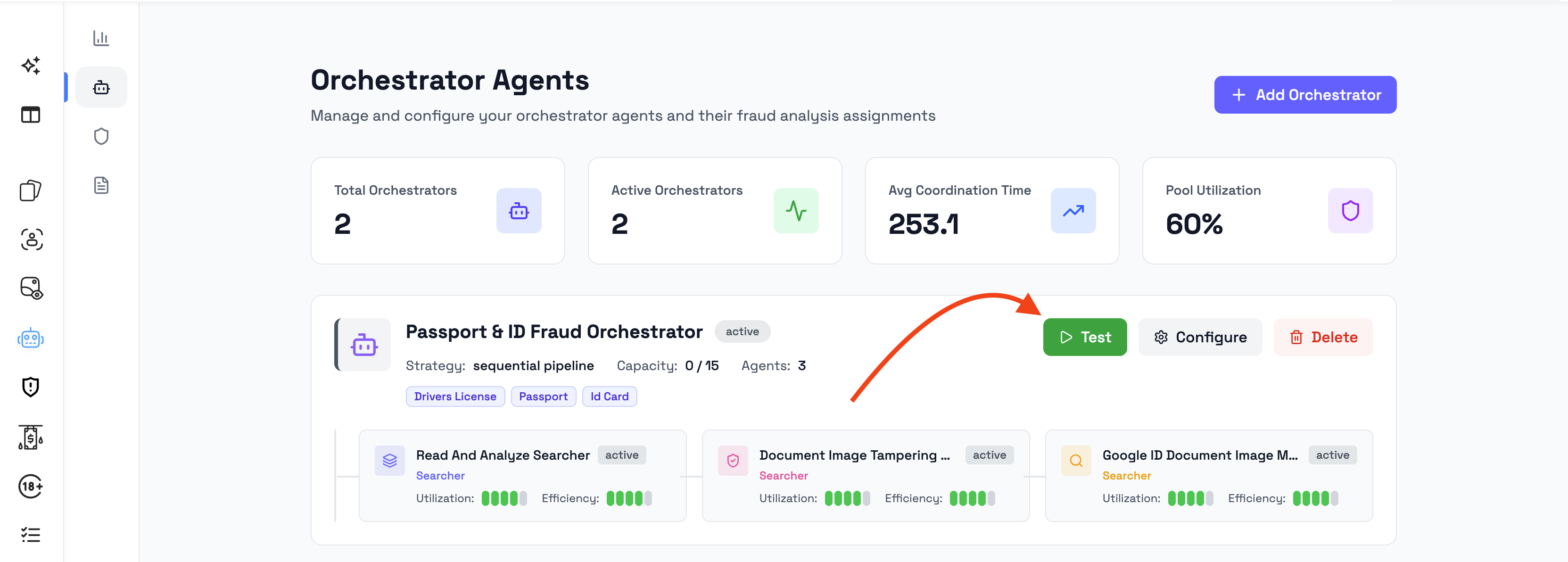
Manual analysis is useful when an admin wants to review a specific document again, choose a specific orchestrator, or run analysis only on selected documents. This can be done by going to:
Agentic Fraud Reasoning --> Orchestrator Agents --> Test
What information is analyzed
Agentic Fraud Reasoning can review the submitted document together with available document information and prior analysis results.
This can include high-level inputs such as:
- the uploaded document file
- document text or extracted content
- document metadata
- document type
- standard fraud detection results
- visible document content
- previous document processing results available in Bynn
The purpose is to produce a structured assessment that explains the fraud risk and highlights relevant concerns.
The exact analysis depends on the document type, the assigned Orchestrator Agent, and the Fraud Analysis Agents connected to it.
Orchestrator Agent role
The Orchestrator Agent coordinates the fraud reasoning analysis.
It is responsible for managing the analysis for the selected document type and combining the findings into one final assessment.
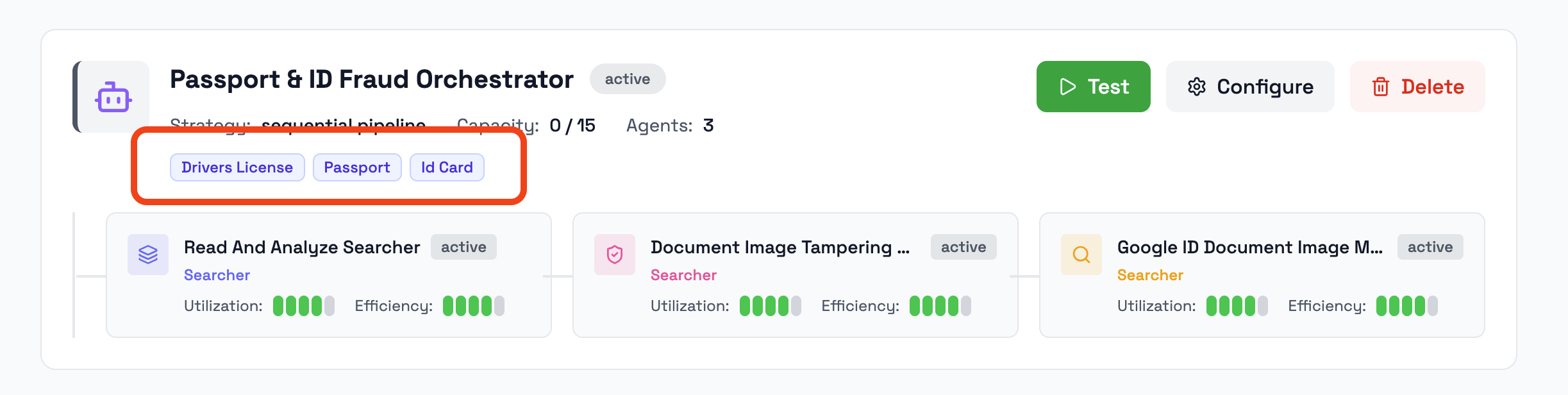
An Orchestrator Agent can be assigned to one or more document types, such as:
- passport
- ID card
- driver license
- bank statement
- supporting document
When a document matches the orchestrator’s configured document types, that orchestrator can be used to perform the fraud reasoning analysis.
Detailed setup is covered in the Orchestrator Agents guide.
Fraud Analysis Agent role
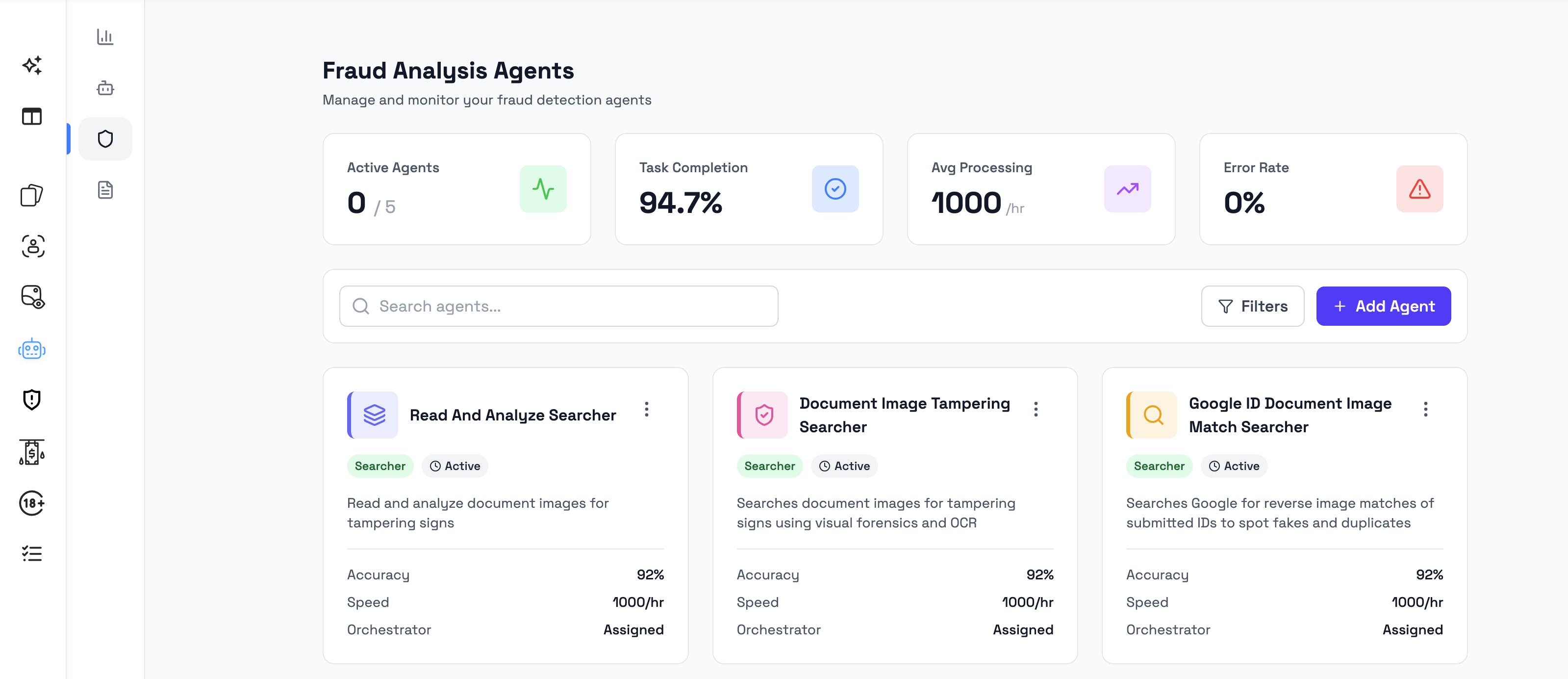
Fraud Analysis Agents perform specific analysis roles as part of the fraud reasoning process.
An Orchestrator Agent can work with one or more Fraud Analysis Agents. Each agent can focus on a specific type of investigation or analysis task.
Depending on the workspace configuration, Fraud Analysis Agents may appear with different types or roles, such as searcher or crawler.
The final result may include an Operator Summary or agent summary showing the findings contributed by the agents involved in the analysis.
Detailed setup is covered in the Fraud Analysis Agents guide.
What happens while analysis is running
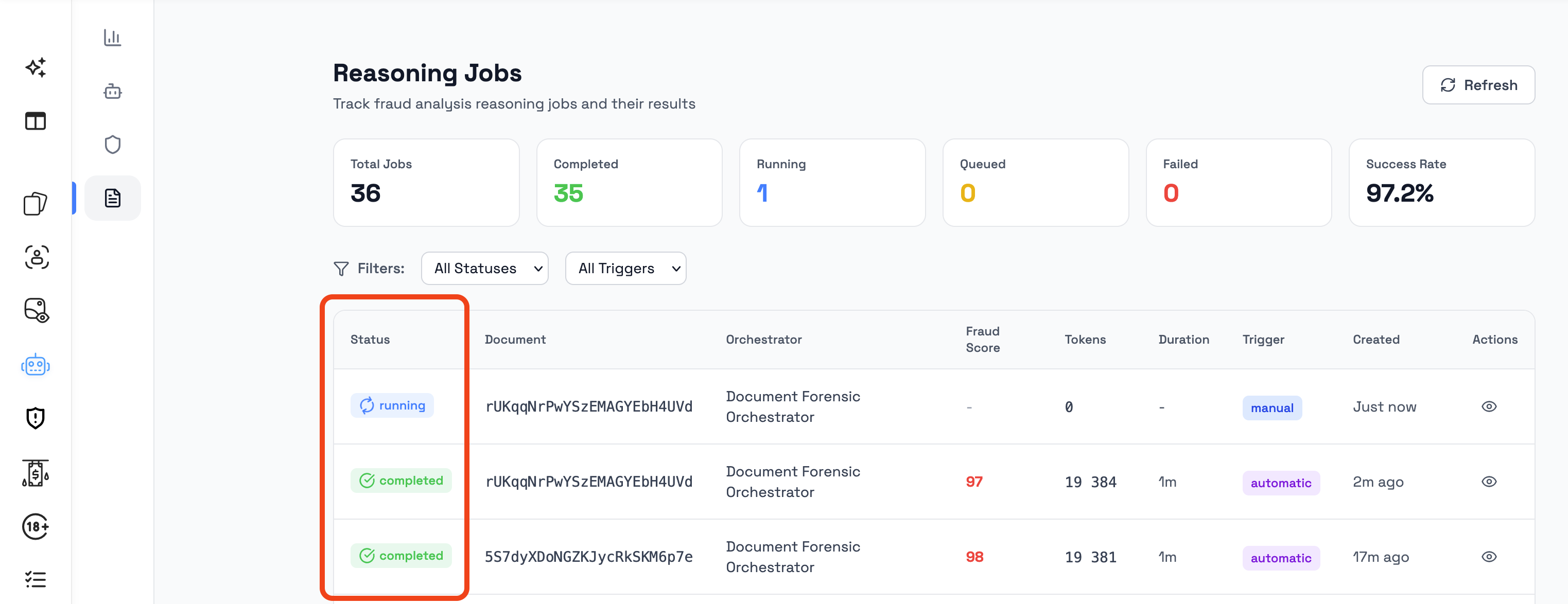
When Agentic Fraud Reasoning is running, the document may show an analysis or processing state in the dashboard.
Admins may see status information such as:
- analysis in progress
- completed analysis
- failed analysis
- available result panel after completion
The exact loading state depends on the dashboard area and workspace configuration.
Agentic Fraud Reasoning is designed to run as part of the document review process without requiring the admin to manually inspect each intermediate step. Once the analysis is complete, the result becomes available in the document detail view.
What happens when analysis completes
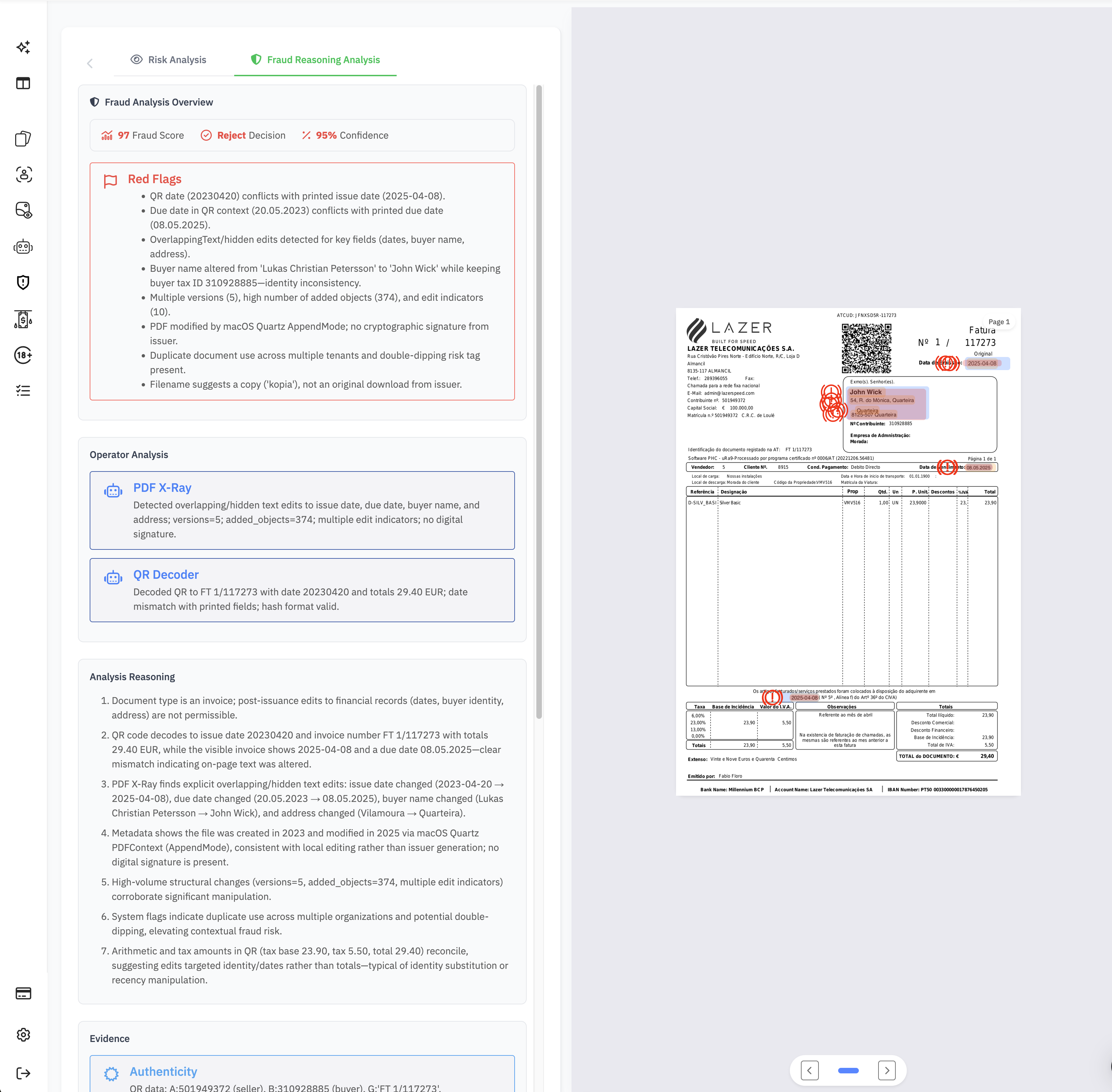
When Agentic Fraud Reasoning completes, the result is shown in the document detail view.
A completed analysis can include:
- Fraud Score
- Decision
- Confidence
- Reasoning
- Red Flags
- Evidence
- Recommendations
- Operator Summary
These fields help admins understand the assessment and decide what to do next.
For detailed explanation of each field, see Understanding fraud analysis results.
If analysis cannot complete
If Agentic Fraud Reasoning cannot complete, the dashboard may show a failed or unavailable result state.
This can happen if the document cannot be analyzed, if the required configuration is missing, or if the analysis process fails.
When this happens, admins should review the visible error state, check the document quality and configuration, and decide whether the document should be reviewed manually or analyzed again if retry options are available.
Detailed failure behavior is covered in the Failure states and edge cases guide.
How Agentic Fraud Reasoning relates to standard fraud checks
Agentic Fraud Reasoning works together with Bynn’s standard document fraud checks.
The standard fraud checks perform the initial fraud analysis on the submitted document. Agentic Fraud Reasoning then adds an AI-assisted reasoning layer that helps explain risk, evidence, and recommended action.
In simple terms:
- Document Fraud Detection checks the document for fraud indicators.
- Agentic Fraud Reasoning reasons about the fraud risk and explains the result.
The two features are complementary. Agentic Fraud Reasoning is designed to provide additional context and explanation, not to replace the standard document fraud checks.
Summary
Agentic Fraud Reasoning works by analyzing a submitted document after earlier document processing and fraud checks have completed.
The feature uses Orchestrator Agents and Fraud Analysis Agents to produce a structured fraud assessment. The completed result helps admins understand fraud risk, review suspicious indicators, and decide whether a document should be accepted, rejected, or reviewed manually.
For configuration details, see Configure Agentic Fraud Reasoning. For result interpretation, see Understanding fraud analysis results.
Updated 3 months ago