
Create a collection
Use the Collections section to create a new document request template that can later be used inside one or more workflows.
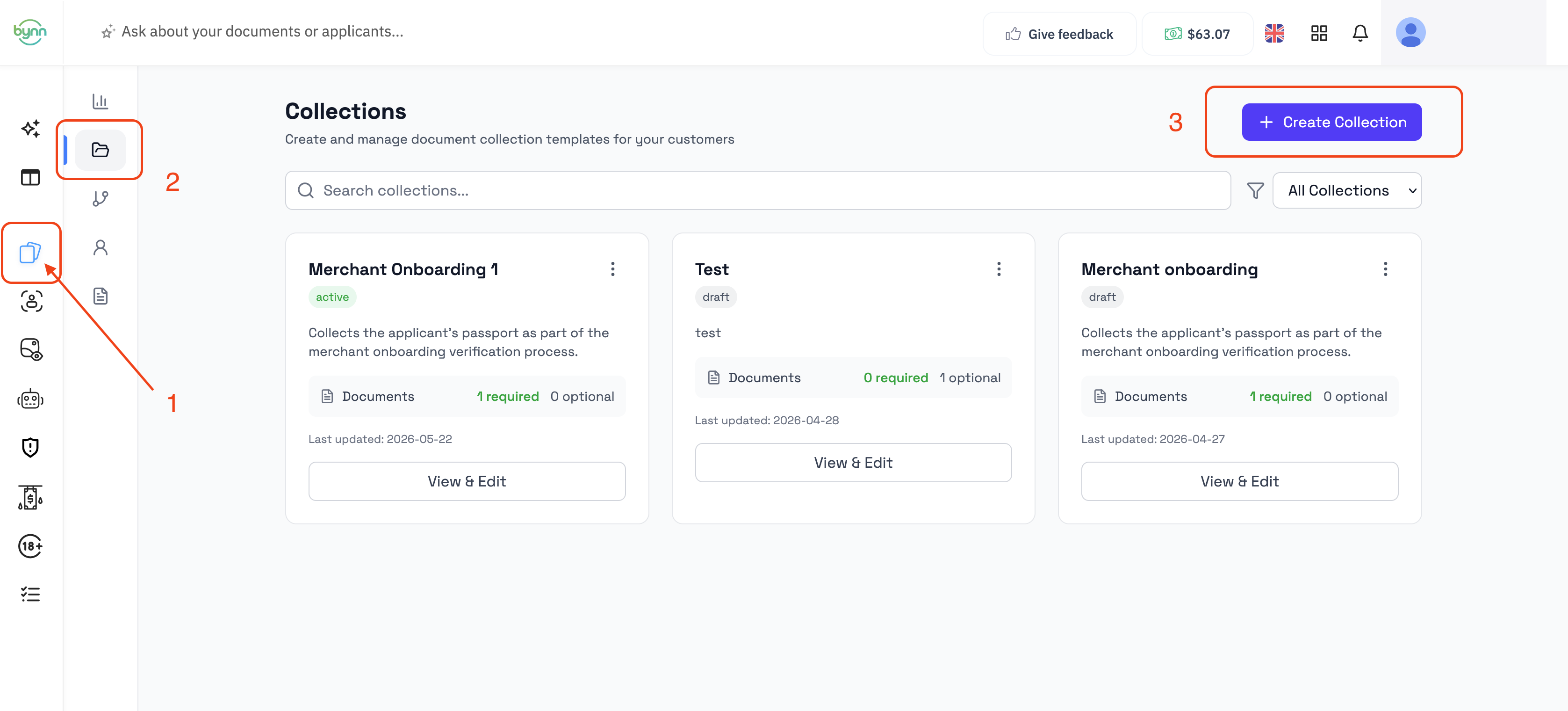
Create a new collection
To create a new collection:
- Open the Collections section
- Click Create Collection
- Enter the basic collection details
- Add at least one document
- Click Save Collection
After saving, the collection becomes available in the Collections list and can be selected later from a Document Collection node in a workflow.
What is required before saving
To create a usable collection, the minimum requirement is to add at least one document.
At the collection level, you can also set:
- Collection Name
- Description
- Status
At the document level, each document added to the collection can then be configured with its own settings.
What happens after the collection is created
Once the collection is saved:
- it appears in the Collections list
- it can be opened again for editing
- it can be selected inside a Document Collection node in a workflow
- it can be reused across multiple workflows
A collection is not launched directly from the Collections section. It is only used through workflows.
How collections are typically created
The usual creation flow is:
- Create the collection
- Add the required and optional documents
- Save the collection
- Open or create a workflow
- Add a Document Collection node
- Select the collection from that node
This means the Collections section is used to define the document request itself, while the workflow determines where and when that request is shown.
Updated 5 months ago